Create SPL Tokens on Solana
Create SPL (Solana Program Library) tokens on the Solana blockchain. Configure mint authority, freeze authority, and create immutable tokens for your Solana DeFi projects. Fast, low-cost token creation on one of the fastest blockchains.
Overview
Solana tokens use the SPL (Solana Program Library) Token standard, which is similar to ERC-20 but optimized for Solana's high-speed blockchain. SPL tokens benefit from Solana's low transaction fees and fast confirmation times, making them ideal for high-frequency DeFi applications.
Supported Solana Networks
Create SPL tokens on these Solana networks:
Solana Mainnet
Production network
Solana Devnet
For testing
Solana Testnet
For testing
SPL Token Features
SPL tokens on Solana include the following features:
SPL Token Standard
- Mint Authority: Address that can mint new tokens (can be revoked for immutability)
- Freeze Authority: Address that can freeze token accounts (can be revoked)
- Decimals: Typically 9 for Solana tokens
- Immutable Tokens: Revoke both authorities to make token completely immutable
- Low Fees: Minimal SOL required for transactions
- Fast Transactions: Near-instant confirmation times
How to Create a Solana Token
- 1
Navigate to Create Token
Visit the Create Token page and select "Solana Token" as your blockchain type.
- 2
Fill Token Details
Enter your SPL token information:
- Name: Full token name
- Symbol: Ticker symbol (3-5 characters)
- Total Supply: Maximum number of tokens
- Decimals: Typically 9 for Solana tokens
Token Details
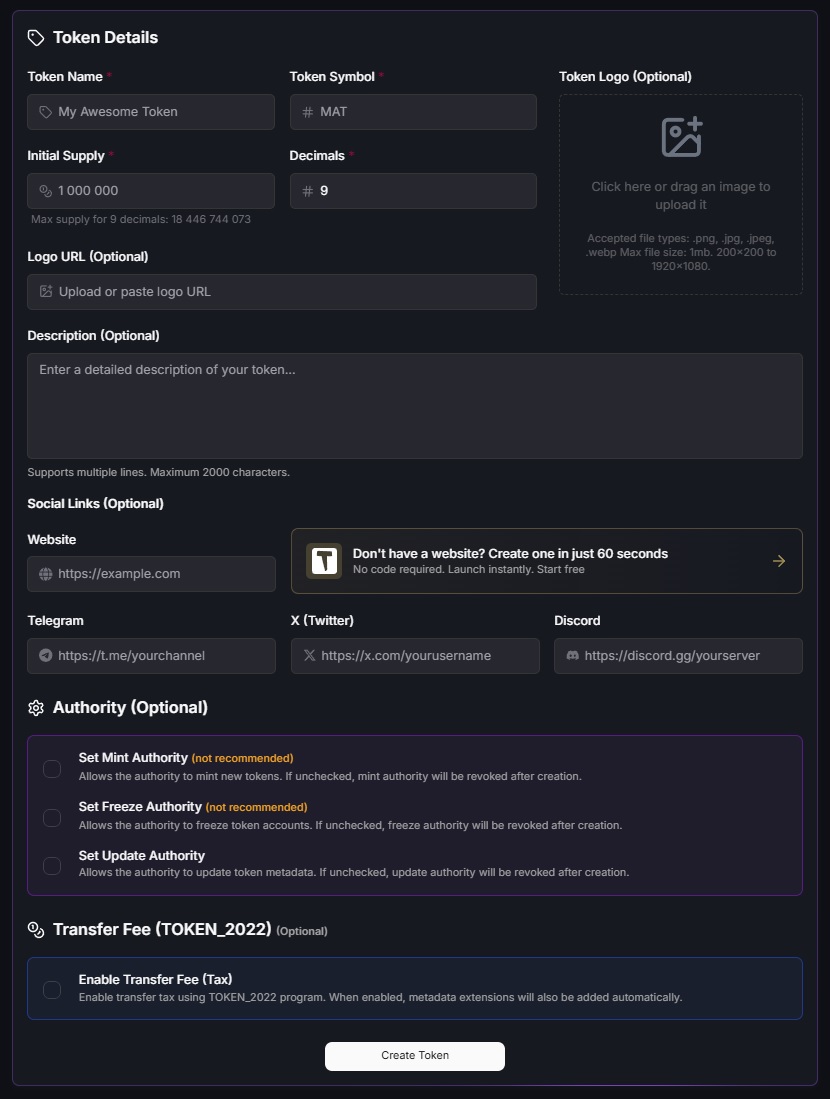
Click the image to zoom in
- 3
Configure Authorities
Set up mint and freeze authorities:
- Mint Authority: Your wallet address (can mint new tokens)
- Freeze Authority: Your wallet address (can freeze accounts) or null
- Immutable: Option to revoke both authorities immediately
Configure Authorities

Click the image to zoom in
- 4
Select Network
Choose Solana Mainnet for production or Devnet/Testnet for testing.
Select Network

Click the image to zoom in
- 5
Review and Deploy
Review all token details and fees. On Solana, you can optionally generate a custom address (vanity address) with a prefix or suffix of your choice for easier recognition.
- Custom Address: Optional vanity address with prefix or suffix (up to 4 characters)
- Address Generation: Choose between prefix or suffix method for your custom address
- Note: Searching for vanity addresses is computationally intensive. Longer prefixes take more time.
Once you're satisfied with all settings, connect your Solana wallet (Phantom, Solflare, etc.) and approve the transaction to create your SPL token.
Review and Deploy
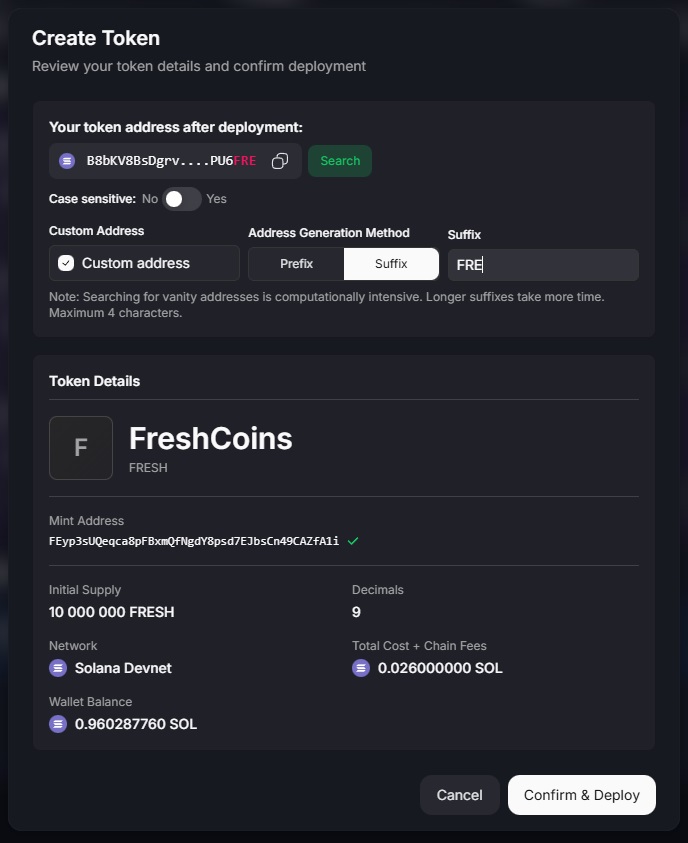
Click the image to zoom in
- 6
Verify Deployment
After deployment, you'll receive your token mint address and transaction signature. Verify on Solana Explorer and view your token in your Solana wallet.
Video Tutorial
Create Solana Token
Watch tutorial: How to create a Solana token
Authority Management
Understanding mint and freeze authorities is crucial for Solana token management:
Mint Authority
The mint authority can create new tokens. You can:
- Mint additional tokens after creation
- Transfer authority to another address
- Revoke authority to make supply fixed
Freeze Authority
The freeze authority can freeze token accounts. You can:
- Freeze specific token accounts
- Unfreeze frozen accounts
- Set to null to disable freezing
- Revoke to make token fully decentralized
Immutable Tokens
To create a fully immutable token, revoke both mint and freeze authorities after deployment. This makes your token completely decentralized with a fixed supply and no ability to freeze accounts. This is recommended for most public tokens.
Fees
Solana token creation fees are significantly lower than EVM chains:
- Platform Fee: Fixed fee for token creation service
- Network Fee: Minimal SOL required (typically less than $0.01)
- Rent: Account rent (refundable when account is closed)
- Testnet: Free (test SOL)
Solana TOKEN_2022
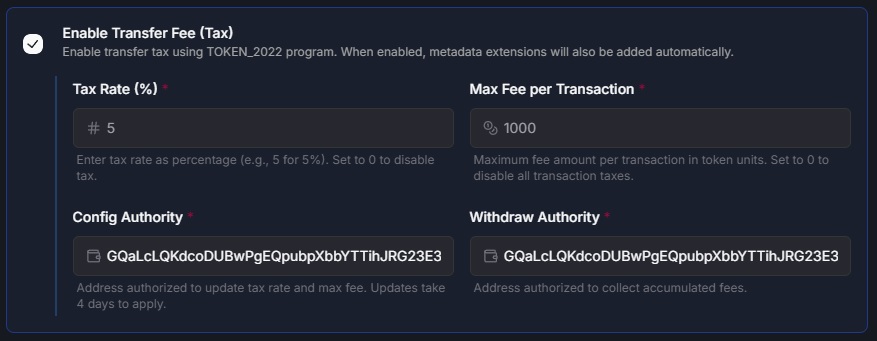
Click the image to zoom in
Best Practices
Before Creating
- Test on Solana Devnet or Testnet first
- Ensure you have a small amount of SOL for fees
- Use a reputable Solana wallet (Phantom, Solflare)
- Plan your authority management strategy
Security Considerations
- Consider revoking authorities for immutability and decentralization
- Keep your wallet secure and never share private keys
- Verify your token mint on Solana Explorer after deployment
- Understand the implications of freeze authority before deploying
Related Resources
Important Disclaimer
Solana token creation is irreversible. Once deployed, you cannot modify basic token parameters like name, symbol, total supply, or decimals. Always test on Devnet or Testnet first and double-check all parameters before deploying to mainnet.
Authority management is critical. If you revoke mint authority, you cannot mint more tokens. If you revoke freeze authority, you cannot freeze accounts. Consider your project needs carefully before revoking authorities.